Starting Geometry Dash has gotten confusing with all the outdated guides and clickbait tips flying around. As someone who’s been playing since the 1.9 days and watched this game evolve through every major update, I learned everything there is to know about what actually matters when you’re new. Today, I will share it all with you.
This isn’t a controls tutorial. You’ll figure out tapping and holding on your own. These are the things I genuinely wish someone had sat me down and told me before I wasted months doing stuff the hard way.
The Game Modes — What Actually Matters
Cube Mode Is Deceptively Deep
Everyone starts with cube. Tap to jump. Simple. Except it’s not, because the timing windows get razor-thin at higher difficulties and you need to internalize jump arcs at different speeds until they’re muscle memory.
Key stuff that took me way too long to figure out:
- Jump height is mostly fixed, but timing determines where you land — this matters more than you think
- Yellow pads boost you into the air automatically when you touch them
- Blue pads flip your gravity
- Orbs activate on tap mid-air for additional jumps or gravity changes
- Portals change everything — game modes, gravity, speed, size
The Other Modes (Quick Rundown)
You’ll hit these as you progress. None of them should feel completely alien by the time you attempt demons:
- Ship — hold to fly up, release to descend. Smooth, continuous control. My personal favorite.
- Ball — tap to switch gravity. Rolls along surfaces. Weirdly satisfying once it clicks.
- UFO — tap for short upward boosts. More controlled than ship, less forgiving than cube.
- Wave — hold to go diagonally up, release for diagonally down. Considered the hardest mode and I won’t argue with that.
- Robot — tap for variable-height jumps. Hold longer, jump higher. Closest thing to a traditional platformer.
- Spider — tap to teleport to the opposite surface. Brain-breaking at first.
- Swing Copter (added in 2.2) — hold to swing one direction, release for the other. Newest mode, still messes with me.
The Official Levels Are Your Training Ground
21 official levels. RobTop designed them as a progression system and they genuinely work as one.
Levels 1-7 (Stereo Madness through Jumper) teach you the basics. I remember being stuck on Dry Out for two days and feeling like I’d never improve. Looking back, that’s hilarious. Complete these to understand fundamental timing.
Levels 8-14 introduce harder timing, new game modes, and the first official demon — Clubstep. This is where most people get stuck and need to develop real skills instead of just mashing through. I spent three weeks on Clubstep alone. Worth every attempt.
Levels 15-21 (Theory of Everything 2 through Fingerdash) are expert territory. Completing these means you’re genuinely good at this game.
The Difficulty System (And Why Demons Aren’t Scary)
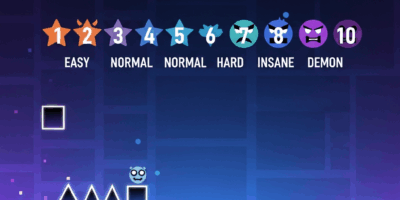
Levels are rated on a star system. Here’s what they actually mean in practice:
- Auto (1 star) — plays itself. No input needed. Good for collecting stars.
- Easy (2 stars) — genuinely easy. You’ll beat these quickly.
- Normal (3 stars) — basic challenge. Nothing threatening.
- Hard (4-5 stars) — requires decent timing. First taste of real difficulty.
- Harder (6-7 stars) — where intermediates start sweating.
- Insane (8-9 stars) — legitimately difficult. Requires real skill.
- Demon (10 stars) — the big leagues. Subdivided into Easy, Medium, Hard, Insane, and Extreme Demon.
Completing rated levels earns stars that unlock icons, colors, and other customization options. Which brings me to something I wish someone had told me early: don’t obsess over unlocks. They’ll come naturally.
User-Created Levels Are Where This Game Really Lives
That’s what makes Geometry Dash endearing to us longtime players — the community content is infinite and wildly creative.
Millions of levels exist. Some are masterpieces. Some are garbage. Here’s how to find the good stuff:
Finding Quality Levels
- Featured tab — levels selected by moderators for quality. Your safest bet for consistently good gameplay.
- Hall of Fame — the best of the best. Historically significant levels.
- Search filters — filter by difficulty, length, whatever you need.
- Lists — curated collections organized by theme or difficulty. Incredibly helpful.
How to Spot a Good Level
Look for high like-to-download ratios, Feature or Epic ratings, Creator Points from established builders, and positive comments from experienced players. If the comments are all “this is unrated garbage,” trust them.

Practice Mode Will Save You Hundreds of Hours
Probably should have led with this, honestly.
Access practice mode by pausing during any attempt. Place checkpoints, respawn after dying, experiment freely with zero penalty. The difference between players who improve and players who plateau almost always comes down to how they use practice mode.
I spent my first two months never touching practice mode because I thought it was “cheating.” Those were two wasted months.
A Realistic Timeline (So You Don’t Feel Broken)
First Week
- Beat official levels 1-7
- Get comfortable with cube jumping and basic ship control
- Explore some easy user levels to see what the community does
First Month
- Push through official levels 8-14
- Practice all game modes until none feel completely foreign
- Start using practice mode on difficult sections (seriously, use it)
- Attempt your first demon. The Nightmare is the classic starting point.
After That
- Complete remaining official levels at your own pace
- Build demon count gradually — Easy, then Medium, then Hard
- Identify your weakest game mode and practice it specifically
- Maybe try level creation to understand how levels are designed
The Community Is Genuinely Great
Key places to connect:
- Official Discord — news, discussion, level sharing
- Reddit r/geometrydash — memes, achievement posts, good discussions
- YouTube — countless content creators covering gameplay, news, and tutorials
- GD Forums — deeper discussion and creator resources
People are generally welcoming to newcomers. Don’t be afraid to ask questions or share achievements, even small ones.
Mistakes I Made So You Don’t Have To
- Skipping practice mode — grinding full attempts without learning sections is just wasted time. Don’t be me.
- Attempting levels way above my skill level — progress gradually instead of bashing against impossible content for days
- Ignoring game modes I was bad at — well-rounded skills matter more than being amazing at one mode
- Playing angry — performance tanks when you’re frustrated. Take breaks.
- Comparing myself to YouTube players — they’ve played thousands of hours. Focus on your own progress.
Why This Game Sticks With You
Simple controls that feel great. Music that makes gameplay feel like rhythm. Infinite community content. Clear progression. A passionate community that keeps pushing boundaries years after release.
I picked this up thinking I’d play for a week. That was three years ago and I’m still here. Welcome to the community.

Related Articles
Continue reading:

Leave a Reply