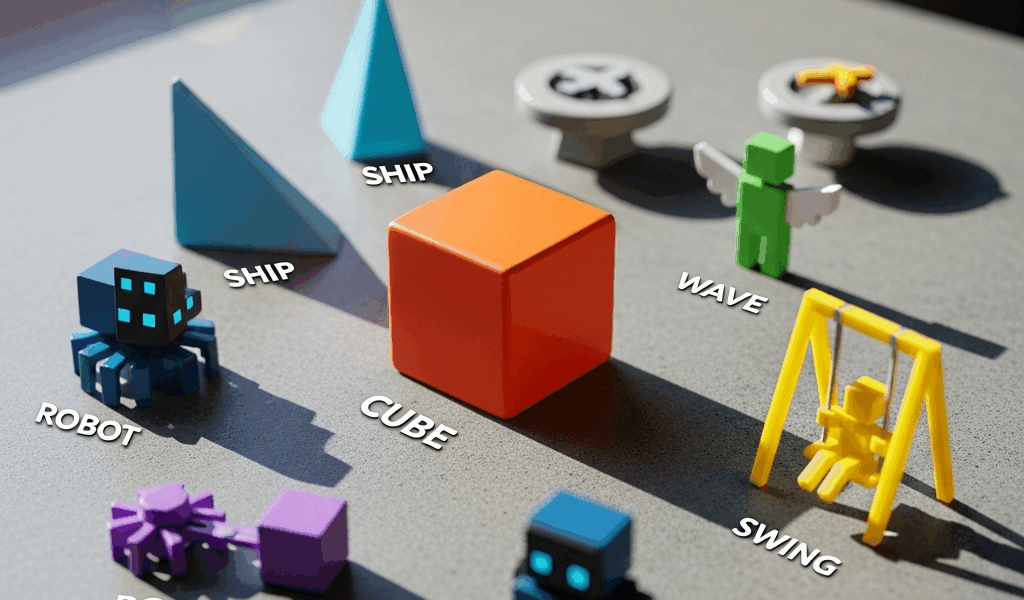
Every Geometry Dash Game Mode Explained — From Cube to Swing
If you’ve ever searched for geometry dash game modes explained and landed somewhere that only covered the cube and ship before giving up, you already know how frustrating that is. There are nine distinct modes in Geometry Dash as of version 2.2, and each one plays completely differently, demands different muscle memory, and shows up in level design in ways that either make sense once explained or feel permanently confusing if nobody walks you through them. I’ve sunk an embarrassing number of hours into this game — we’re talking years of on-and-off play starting back when 1.9 was the current version — and the single biggest turning point in my improvement wasn’t practicing harder. It was actually understanding what each mode was asking my hands to do.
This breakdown covers all nine modes, how the physics work in plain terms, and what the game is actually testing when it throws each one at you.
Cube Mode — Where Everyone Starts
Cube is the default. Every level in Geometry Dash opens in cube mode unless the creator has done something unusual, and it’s the mode the game uses to teach you that one input — a tap, a click, a spacebar press — does one thing. In cube mode, that one thing is jump.
The cube jumps with a fixed arc. You tap once, you get one jump. If you’re in the air, you can tap a second time for a double jump, but that’s your limit before gravity pulls you back down. The timing game here is entirely about anticipating where your cube will land relative to an obstacle. Spikes are usually one unit tall. Blocks are one unit tall. The cube clears one block height comfortably with a single jump, and the double jump gets you over two stacked blocks without much trouble.
Gravity portals flip everything. Hit a blue upside-down portal and suddenly the floor is the ceiling — your jump now sends you downward toward what used to be the sky. This doesn’t change the input at all. You still tap to jump. The disorientation is entirely visual and mental, not mechanical. New players often freeze up and die in gravity-flipped sections not because the skill requirement changed but because their brain is fighting the visual.
Yellow jump pads launch you automatically at a fixed height. Yellow jump rings (orbs) require you to tap while touching them to activate. That distinction — automatic versus input-required — matters a lot as levels get more complex. Missing an orb because you didn’t tap is a different failure mode than misjudging a jump arc, and recognizing which one you’re dealing with speeds up practice runs considerably.
Probably should have opened with this section, honestly, given how much the cube’s basic logic underpins every other mode. The arc physics carry over. The gravity portal mechanic carries over. Get comfortable with the cube and you’re not starting from zero when something new shows up.
Ship, Ball, UFO, and Wave
These four modes arrive early in the standard level progression and represent four completely different control philosophies. Lumping them together isn’t lazy — it’s actually useful, because the contrast between them is the fastest way to understand what each one wants.
Ship Mode
Hold the input and the ship flies upward. Release it and the ship descends. That’s the entire control scheme, but the execution is deceptively precise. The ship accelerates in whichever direction you’re pushing, which means it has momentum. Let go after holding for half a second and the ship doesn’t stop instantly — it drifts downward before leveling out. The skill being tested is throttle control, the ability to hold briefly, release briefly, and maintain altitude in narrow corridors without touching the ceiling or floor.
Straight fly sections — where you hold perfectly still at one height for an extended stretch — are a genuine test of hand steadiness. I failed the straight fly in Clubstep probably forty times before I realized I was gripping my mouse too hard and introducing micro-tremors. Loosening my grip fixed it in three attempts.
Ball Mode
The ball rolls along surfaces and taps switch gravity. One tap sends you to the ceiling. Another tap sends you back to the floor. Unlike the cube’s jump arc, the ball doesn’t travel through the air — it snaps to the opposite surface almost immediately. The timing game is about switching gravity at exactly the right moment to thread through a gap or land on a platform rather than smash into a spike.
Ball sections frequently use gravity orbs placed mid-air as timing cues. You’re not flying to them — you roll off a ledge and time the switch so you land correctly. It’s rhythmic in a way ship isn’t.
UFO Mode
Each tap gives the UFO a small upward burst of speed, and then gravity pulls it back down until the next tap. Unlike the ship, there’s no holding — every bit of lift is a discrete input. The UFO has less momentum than the ship but more than the cube’s fixed arc. Close-quarters UFO sections that require rapid taps to maintain height are among the most finger-fatiguing sequences in the game.
Wave Mode
Hold the input and the wave travels diagonally upward at a fixed 45-degree angle. Release and it travels diagonally downward at the same angle. There is no middle ground, no hovering, no fine throttle. You are always moving at a diagonal, and the corridors wave sections use are built around that constraint.
Struck by how unforgiving wave corridors can be, many players initially try to treat the wave like the ship — holding and releasing in longer bursts. That approach works in wider corridors and falls apart completely in the “mini wave” sections that show up in harder demons, where the corridor is barely wider than the icon itself and any angle error clips a wall.
The wave rewards rhythmic, musical timing more than any other mode. Players who sync their inputs to the soundtrack often outperform players who try to read the geometry visually.
Spider and Swing Copter — 2.2 Additions
Version 2.2 was a long time coming — the update took roughly seven years — and when it finally dropped, it brought two new modes that genuinely changed what level designers could ask players to do. Spider and Swing Copter aren’t just reskins of older modes. They operate on different principles.
Spider Mode
The spider teleports instantly to the opposite surface on each tap. Not a jump, not a gravity flip with drift — a teleport. One frame it’s on the floor, the next it’s on the ceiling. This sounds similar to the ball’s gravity switch, but the ball still has a brief moment of travel time as it rolls to the new surface. The spider has none. The visual result is jarring, almost violent, and the level design consequence is that spider sections can place obstacles much closer together than ball sections can because the mode never occupies the middle space between surfaces.
Spider sections in well-designed levels tend to use the ceiling and floor as separate “lanes” with obstacles specific to each, and your job is to stay in the correct lane at the correct moment. The teleport removes the arc-reading skill from the equation entirely. It’s pure pattern recognition and timing.
Swing Copter Mode
The swing copter moves forward and alternates gravity direction with each tap. Tap once — gravity flips upward, copter rises. Tap again — gravity flips downward, copter falls. The twist is that each tap reverses the direction of gravitational pull, so the momentum compounds if you tap too rapidly. Two quick taps send you sharply up and then sharply down. The control challenge is managing that pendulum-like swing to navigate openings without the oscillation amplitude getting too wide.
Swing copter levels feel like they have a natural tempo built in — tap too fast or too slow and the swings become unmanageable. Finding the rhythm for a particular corridor is half the battle. The mode rewards players who can feel tempo rather than react purely to visual cues.
Both spider and swing copter change level design in meaningful ways. Spider enables staccato, rapid-switch layouts that would be impossible with ball. Swing copter enables flowing, sinusoidal corridors that would be miserable in UFO. Creators immediately started exploiting both, and the hardest 2.2 levels layer them into the kind of mixed sequences covered in the next section.
Dual Mode and Mixed Mode Challenges
Dual mode isn’t a separate icon — it’s a state the game can enter where you control two icons simultaneously. Both icons respond to the same inputs. Tap once and both jump, or fly up, or switch gravity, depending on which mode each icon is in. This sounds manageable until you’re in a section where the two icons are in different modes.
The classic nightmare scenario is dual cube and ship. One tap makes the cube jump with a fixed arc and also cuts the ship’s thrust. Your input has to satisfy the timing requirements of two completely different physics systems at the same time with one button. Level designers who want to create specifically difficult sequences will set up the dual modes so that the ideal input timing for one icon is directly opposed to the ideal timing for the other.
Split-screen dual is a variant where the two icons occupy separate visual spaces on the screen — one on top, one on bottom — rather than sharing a single play field. This removes some of the visual chaos of standard dual mode but introduces a different problem: your attention has to ping-pong between two separate games happening at the same time. Long split-screen segments are genuinely exhausting in a way that single-icon gameplay rarely is.
Mixed mode challenges, where the level cycles rapidly through multiple modes in sequence, test whether your mode-specific muscle memory can switch cleanly without the previous mode’s habits bleeding into the next one. After a long ship section, your thumb wants to hold. If the next segment is wave, holding is correct and you’ll be fine. If the next segment is UFO, holding does nothing and you need to transition to discrete taps instantly. Players who’ve drilled each mode in isolation sometimes fall apart in transitions because isolation practice doesn’t build the switching reflex.
The hardest demon levels — top 50 on the Pointercrate list, community-rated Extreme Demons — tend to feature sequences where you’re cycling through four or five modes within a ten-second segment, each one tuned to require near-frame-perfect inputs. Watching a completion video of a level like Avernus or Slaughterhouse and recognizing each mode as it appears is a genuinely different experience once you understand what the player’s hand is doing in each segment. The chaos resolves into something legible.
Learning the modes in order — cube first, then ship and wave, then ball and UFO, then spider and swing, then dual — is the approach that builds the most durable understanding. Trying to pick up everything at once by playing random featured levels tends to produce players who are mediocre at everything and frustrated by their own inconsistency. Deliberate mode-specific practice in simpler levels, even if those levels feel unchallenging, builds the clean muscle memory that holds up when a mixed sequence arrives and there’s no time to think.
Each mode in Geometry Dash is, at its core, a single question about what your input does to an object with specific physics. Answer that question clearly for all nine modes and the game opens up considerably.

Leave a Reply