
For years, the Click Between Frames mod was the most controversial tool in competitive Geometry Dash. Some players swore it was essential for beating extreme demons. Others called it cheating. Then in January 2026, RobTop settled the debate by building it directly into the game. Click Between Steps is now an official feature in version 2.208, and it fundamentally changes how your inputs register during gameplay.
If you have heard about CBF but never really understood what it does or why it matters, this is the breakdown.
What Click Between Frames Actually Does to Your Inputs
Geometry Dash runs on a frame-based physics system. At 60 frames per second, the game checks for your input once every 16.67 milliseconds. If you click or tap between those check points — which happens constantly because human reaction time does not align perfectly with game frames — your input gets rounded to the nearest frame. Sometimes that rounding pushes your click to the next frame, which means your actual timing was perfect but the game registered it late.
In casual gameplay, this rounding is invisible. You die and assume you clicked too early or too late. But at the extreme demon level, where some inputs need to land within a one-frame window (16 milliseconds), that rounding error is the difference between clearing a section and dying. Players with identical skill levels could get different results depending on whether their click happened to land near the beginning or end of a frame.
Click Between Frames (now Click Between Steps) fixes this by allowing the game to register your input at the exact moment you pressed, not at the next frame boundary. Your click at 8 milliseconds into a frame gets processed at 8 milliseconds, not at 16.67. The result is that the game responds to what you actually did rather than an approximation of what you did.
Think of it like the difference between a clock that only shows hours versus one that shows minutes and seconds. The underlying time is the same — your inputs are the same — but the precision of the measurement changes. And at the highest levels of play, that precision matters enormously.
The Mod vs the Official 2.208 Feature
The original Click Between Frames mod was created by a community developer and hosted on GitHub. It worked through the Geode modding platform and required players to install third-party software. While widely used — especially among top players grinding the demonlist — it existed in a gray area. Some leaderboards accepted CBF completions. Others did not. The legitimacy debate never fully resolved.
On January 20, 2026, RobTop released version 2.2081 (later called 2.208) with Click Between Steps built in as a native feature. No mods required. No Geode. No third-party downloads. It is a toggle in your game settings, and every leaderboard and demonlist that allows the official game automatically allows it.
The key differences between the mod and the official feature are subtle but worth knowing. The original mod included its own physics bypass system in the settings, which could interact with frame rate in ways the official version does not. The official Click Between Steps is simpler — it does one thing and does it cleanly. If you were using the mod before, switch to the built-in version. It is more stable, universally accepted, and gets updated alongside the game itself.
How to Enable and Configure Click Between Steps
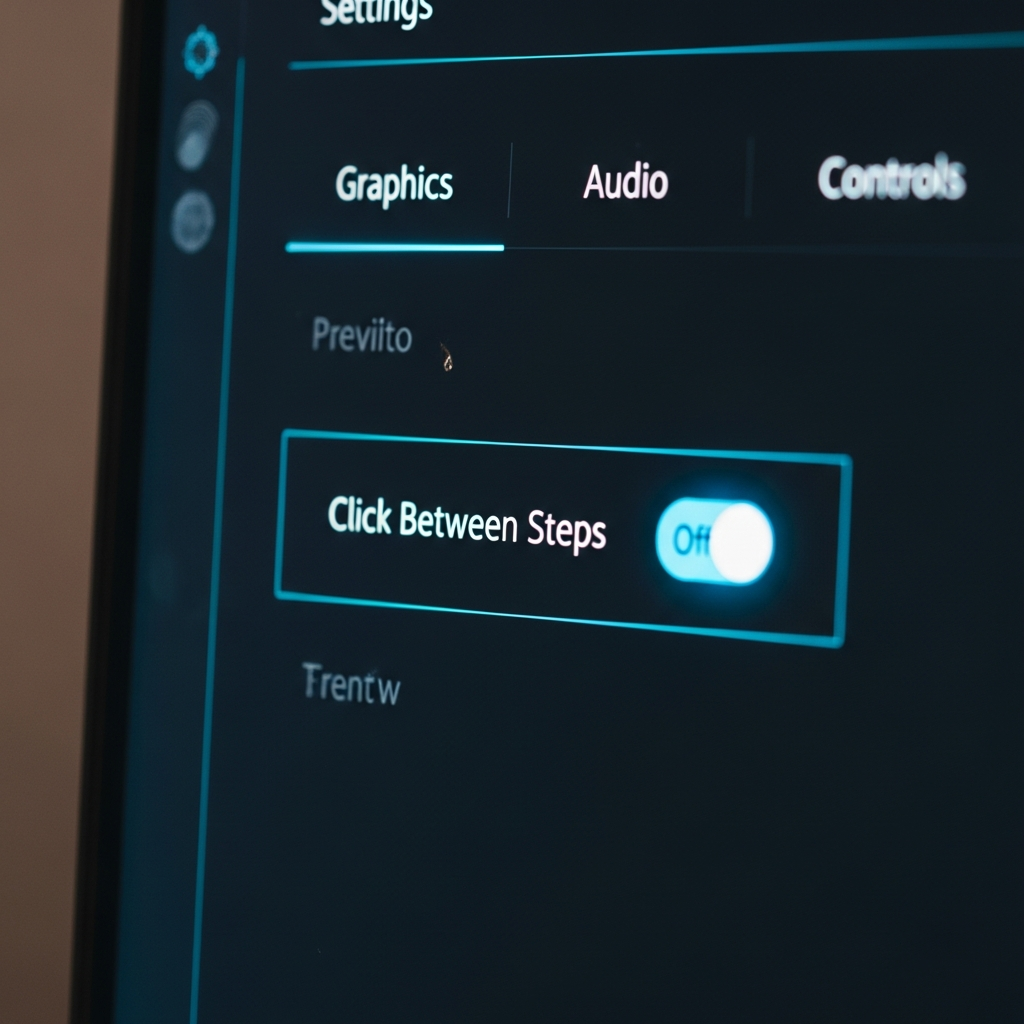
Open Geometry Dash and go to the main Settings menu. Navigate to the Gameplay section. Look for the Click Between Steps toggle — it is listed among the gameplay options alongside things like auto-retry and flip controls. Turn it on. That is it.
There is no additional configuration needed. Unlike the mod version, which had multiple sub-settings, the official implementation is a single on-off switch. Once enabled, it applies to all game modes across all levels.
One thing to know about the interaction with FPS: Click Between Steps works at whatever frame rate your device runs the game at. On PC with a high refresh rate monitor, the base frame timing is already tighter, so the improvement from CBS is less dramatic but still measurable. On mobile at 60fps, where frame windows are wider, the improvement is more noticeable. Either way, turning it on is strictly better than leaving it off — there is no downside.
If you are on mobile, the feature works identically. Both iOS and Android received Click Between Steps in the January 29, 2026 update (2.2081). The toggle is in the same Gameplay settings location.
How CBF Changes Your Gameplay
The game modes that benefit the most are wave and ship. Both require sustained precision inputs where tiny timing differences compound over long sections. In wave mode, a single frame of late input can send your wave path slightly higher or lower than intended, which cascades into a death three seconds later. With Click Between Steps, your wave path tracks your actual inputs more faithfully, and those cascading errors happen less often.
Ship mode benefits similarly, especially in tight corridor sections where you are making constant micro-adjustments. The improved input precision means your ship responds more predictably to rapid taps, which makes tight passages feel more consistent between attempts.
For cube and ball sections that rely on single-click timing, the improvement is real but less dramatic. You still need to click at the right time — CBS just ensures that when you do click at the right time, the game acknowledges it. Those frustrating deaths where you swore you clicked correctly but died anyway? Some of them were genuine frame-rounding errors, and CBS eliminates those.
Competitive players have described it as “the game finally feeling fair.” Your deaths are now your deaths — not the game rounding your input to the wrong frame. For most players working through demons and above, this is not a cheat or an advantage. It is the game working the way you always assumed it was working. Turn it on and leave it on.

Leave a Reply