Creating levels in Geometry Dash opens up endless possibilities for expression and challenge design. The level editor is a powerful tool that has enabled thousands of creators to build everything from simple beginner levels to the most complex extreme demons. This comprehensive handbook covers everything you need to know to start creating your own Geometry Dash levels.
Getting Started with the Editor
Accessing the Editor
The level editor is available from the main menu by selecting Create. You can start a new level or edit existing creations from this screen. New creators should start with a fresh level to learn the basics without dealing with existing complexity.
Editor Interface Overview
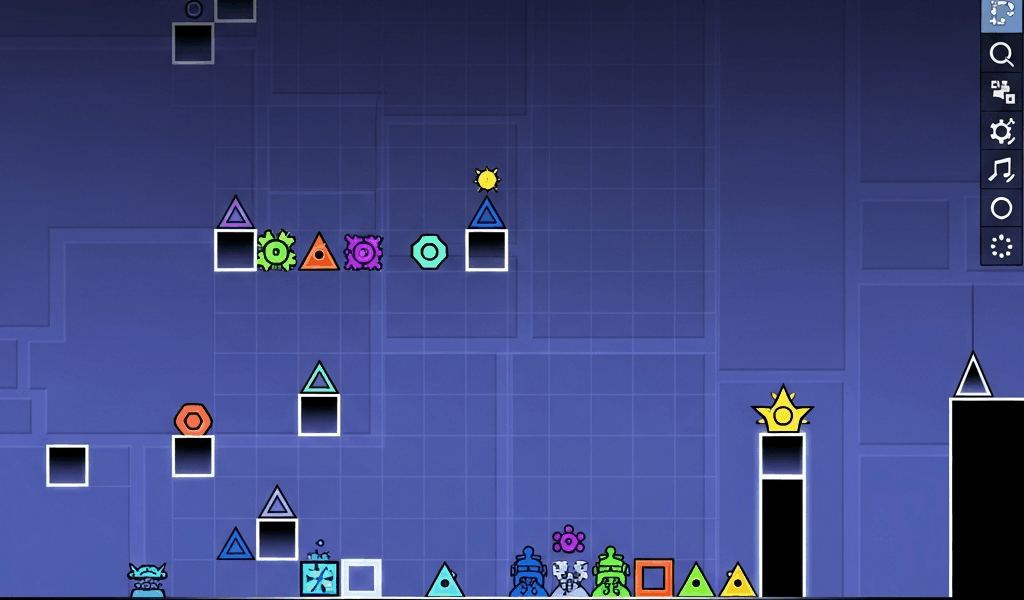
The editor interface features several key elements. The main editing area shows your level from a top-down perspective. The object menu on the right contains all building blocks available for level creation. The control bar at the bottom provides access to testing, settings, and various editing tools. Understanding this layout is essential before diving into creation.
Basic Controls
Place objects by selecting them from the menu and tapping in the edit area. Move objects by selecting and dragging them. Delete objects by selecting and using the delete button. These simple controls form the foundation of all level building.
Understanding Object Categories
Blocks and Platforms
Blocks form the solid ground your player moves on. The editor includes various block styles from simple squares to complex decorative shapes. Ground blocks should create clear paths while decoration blocks add visual interest without affecting gameplay.
Hazards and Obstacles
Spikes are the most common hazard, killing the player on contact. Spike variants include different sizes, angles, and styles. Saw blades add moving dangers. The key to good level design is placing hazards that challenge players fairly without feeling cheap or random.
Portals and Modifiers
Portals change gameplay dramatically. Speed portals alter movement speed from half to quadruple normal. Gravity portals flip the player upside down. Game mode portals switch between cube, ship, ball, UFO, wave, robot, spider, and swing copter. Size portals make the player larger or smaller. Understanding portal placement is crucial for varied level design.
Orbs and Pads
Jump orbs and pads provide additional movement options. Yellow orbs give standard jumps. Blue orbs reverse gravity. Green orbs create a standard jump plus gravity reversal. Pink orbs give smaller jumps. Red orbs send players in specific directions. Pads activate automatically when touched, while orbs require player input.
Triggers and Effects
Triggers create dynamic level behavior. Move triggers relocate objects. Rotate triggers spin objects. Color triggers change colors over time. Alpha triggers adjust transparency. Pulse triggers create visual rhythmic effects. Mastering triggers separates basic creators from advanced builders.
Building Your First Level
Start Simple
Your first level should focus on basic gameplay without complex decoration. Create a straightforward path using blocks and simple spike patterns. Test frequently to ensure playability. A simple level that works is better than a complex mess that frustrates players.
Establish Rhythm
Good Geometry Dash levels sync with music. Place obstacles where beats hit. Create patterns that match musical phrases. The best levels feel like playing music rather than dodging random obstacles. Listen to your selected song repeatedly before building to internalize its rhythm.
Progressive Difficulty
Levels should generally increase in difficulty as they progress. Start with easier sections that teach mechanics. Gradually introduce harder challenges. Save the most difficult sections for the end when players are warmed up and invested in completing the level.
Test Constantly
Use the play button frequently during creation. What looks reasonable in the editor might be impossible or trivial in actual gameplay. Testing helps you understand how your creations actually feel to play.
Intermediate Building Techniques
Using Layers
The editor supports multiple layers for organizing objects. Gameplay elements should be on the main layer. Background decoration goes on lower layers. Foreground effects use higher layers. Proper layer organization makes editing complex levels manageable.
Color Channels
Color channels allow dynamic color changes throughout levels. Assign objects to color channels, then use color triggers to modify them. This creates visual variety without manually recoloring individual objects. Planning your color scheme before building saves time.
Groups and Linking
Grouping objects allows simultaneous manipulation. Assign objects to groups, then target groups with triggers. A single move trigger affecting a group can animate dozens of objects. This technique enables complex animations that would be impossible to create object-by-object.
Spawn Triggers
Spawn triggers activate other triggers at specific moments. This enables trigger chains and complex sequences. A single spawn trigger can start cascading effects that transform entire sections of your level. Master this for truly dynamic creations.
Advanced Decoration Techniques
Glow and Pulse Effects
Glow objects add atmospheric lighting to levels. Combine glow with pulse triggers for rhythmic visual effects. Subtle glow enhances mood while excessive glow creates visual noise. Balance is essential for professional-looking decoration.
Background Design
Background elements set the scene for your level. Use lower layers for distant objects that scroll slowly. Create depth through parallax effects where closer backgrounds move faster. Well-designed backgrounds transform basic levels into immersive experiences.
Air Decoration
The space above and around gameplay areas needs attention too. Floating decorative elements, particle effects, and moving objects fill empty space. Air decoration should enhance without distracting from gameplay.
Custom Objects
Combining basic objects creates custom shapes and designs. Overlap, rotate, and scale objects to build unique decorations. The best creators develop signature styles using creative object combinations.
Music and Sync
Song Selection
Song choice significantly impacts level quality. Choose songs with clear beats for easier syncing. Avoid songs that are too fast or slow for comfortable gameplay. Consider whether the song fits your visual theme. The best levels pair perfect songs with matching aesthetics.
Sync Guidelines
Place major obstacles on strong beats. Use minor decorative pulses on weaker beats. Create build-ups during musical build-ups. Drop intensity during breakdowns. Let the music guide your level structure for natural flow.
Using Song Markers
The editor allows placing guidelines at specific song moments. Mark important beats, drops, and transitions before building. These markers serve as reference points ensuring consistent sync throughout your level.
Level Optimization
Object Count Management
Every object affects performance. Excessive objects cause lag on slower devices. Combine objects where possible. Remove unnecessary decoration from areas players pass quickly. Optimization ensures your level runs smoothly for all players.
LDM (Low Detail Mode)
Creating an LDM version removes intensive decoration while preserving gameplay. Assign decorative objects to high detail groups. LDM triggers can disable these groups for players who need better performance. This accessibility feature expands your potential audience.
Testing on Different Devices
If possible, test your level on various devices. A level that runs perfectly on a high-end computer might struggle on mobile. Understanding these limitations helps you create levels that everyone can enjoy.
Getting Your Level Featured
Feature Criteria
Featured levels meet quality standards set by RobTop. They require balanced gameplay, good decoration, appropriate difficulty rating, and overall polish. Featured levels appear in the featured section and earn creator points.
Epic Rating
Epic rating represents the highest quality tier. Epic levels feature exceptional decoration and creative gameplay. Very few levels achieve epic status, making it a significant achievement.
Mod Review Process
Level moderators review uploaded levels for featuring consideration. Quality uploads get noticed. Engaging with the creator community and improving based on feedback increases your chances of recognition.
Common Mistakes to Avoid
Blind Jumps
Never hide obstacles off-screen where players cannot see them coming. This creates unfair deaths that frustrate rather than challenge. Players should always have time to react to visible threats.
Inconsistent Difficulty
Difficulty spikes and drops break flow. If your level is easy demon difficulty, maintain that consistently. Random hard sections in easy levels or easy sections in hard levels confuse players about what to expect.
Cluttered Gameplay
Decoration should never interfere with seeing obstacles. If players cannot tell what kills them, your decoration is too heavy. Maintain visual clarity in gameplay areas regardless of decoration intensity.
Copied Content
Using other creators objects without permission damages your reputation. Create original work or properly credit collaborators. The community values originality and punishes plagiarism.
Building a Creator Portfolio
Consistent Style
Developing a recognizable style helps build a following. Whether through color choices, decoration techniques, or gameplay philosophy, consistency helps players identify your work.
Regular Uploads
Consistent uploading keeps your profile active and visible. Quality matters more than quantity, but completely inactive creators fade from community memory.
Community Engagement
Participate in creator communities through forums, Discord servers, and social media. Give feedback on others work. Collaborate on megacollabs. Networking opens opportunities for recognition and improvement.
Collaboration and Megacollabs
Finding Collaborators
Megacollabs bring multiple creators together on single levels. Join creator communities to find collaboration opportunities. Start with smaller collabs before attempting massive projects.
Section Standards
When contributing to collabs, match the established style and quality level. Your section should blend seamlessly with others. Inconsistent sections hurt the overall project.
Communication
Clear communication prevents collab disasters. Establish deadlines, style guides, and quality expectations upfront. Regular check-ins keep projects on track.
Resources for Creators
Tutorial Videos
YouTube hosts countless Geometry Dash editor tutorials. Search for specific techniques you want to learn. Watching skilled creators work teaches tricks that text cannot convey.
Creator Communities
Discord servers dedicated to level creation provide feedback, collaboration opportunities, and support. Join multiple communities to maximize your learning and networking.
Practice Through Recreation
Recreating sections from levels you admire teaches techniques directly. Analyze how great creators achieve their effects, then apply those lessons to original work.
Conclusion
Level creation in Geometry Dash offers unlimited creative potential. Starting with basic building and progressing through advanced techniques takes time and practice. The best creators developed their skills over years of consistent effort and community engagement.
Do not expect immediate success or recognition. Focus on improving with each level. Seek feedback, study excellent work, and push yourself to try new techniques. The journey from first level to featured creator is long but immensely rewarding.
Every legendary level in Geometry Dash started with someone opening the editor and placing their first block. Your creations could become the next community favorites. The tools are available, the community is supportive, and the only limit is your dedication to the craft.
Related Articles
Continue reading:
Leave a Reply