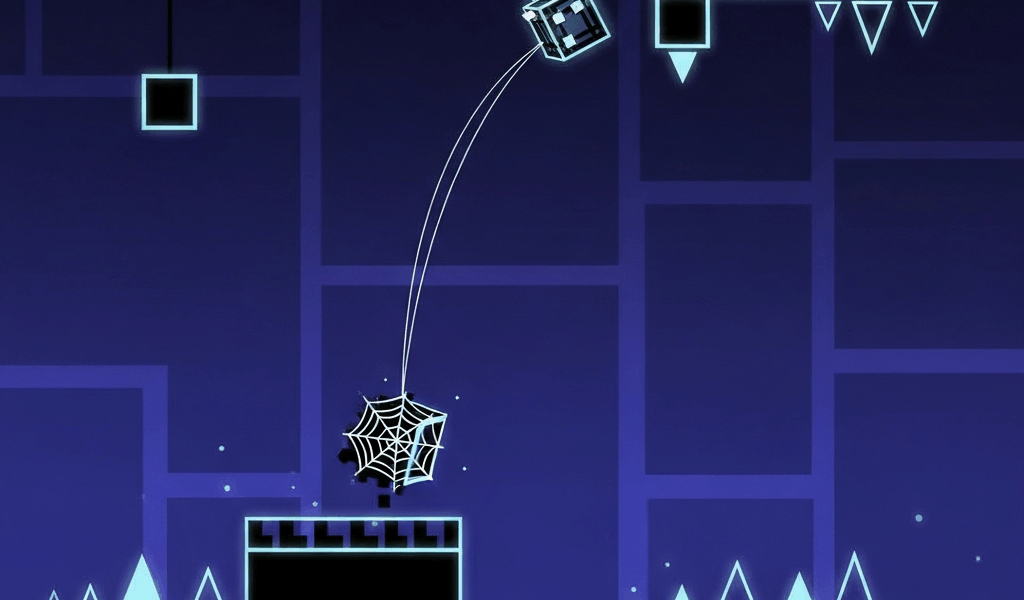
Spider mode has gotten a reputation for being confusing, and honestly, that reputation is earned. As someone who spent a lot of time dying constantly in sections that looked completely straightforward — unable to figure out the disconnect between what I was inputting and what was actually happening — I eventually broke the mode down completely. Today I’ll share everything.
The issue wasn’t reaction time. It was that teleportation physics work differently enough from normal movement that instincts built in cube and ball mode were actively working against me.
Basic Mechanics
Tap to teleport to the opposite surface. The spider moves forward automatically — you control only the teleport timing. What most basic guides skip is why teleportation feels delayed even though it looks instantaneous on screen.
The teleportation doesn’t activate the frame you tap. It activates after a consistent but perceptible processing window. Players coming from cube mode, where jump response is nearly immediate, tap too late because they’re waiting to see the obstacle before reacting. By the time the teleport executes, the collision has already happened. I spent a while being baffled by this before I understood it.
Key Tips
- Tap early — anticipate, don’t react. If you wait until an obstacle is directly in front of you before tapping, you’re teleporting too late. Start tapping as you approach the point where you need to be on the other surface, not when you arrive.
- Watch the landing zone, not the spider. Your eyes should track where you’ll land after the teleport, not follow the spider’s current position. Knowing the landing surface is safe is what allows you to tap with confidence.
- Mini spider teleports faster but through tighter gaps. When a portal changes you to mini form, your teleport speed increases but gap tolerance decreases. Recalibrate your tap timing immediately after any form change.

Common Death Patterns and Their Causes
Dying immediately after teleporting: The surface you landed on has an obstacle directly at the landing point. This requires reading the destination surface before teleporting, not just reacting to where you currently are. Slow down your practice runs to observe both surfaces simultaneously.
Missing narrow teleport windows: Some sections require teleporting through a gap that’s only open briefly. These are timing puzzles as much as reaction challenges. Memorizing when the gap opens is often faster than developing raw reaction speed.
Double-tapping accidentally: Under pressure, players sometimes tap twice in rapid succession, teleporting and immediately teleporting back. If this is happening, lighten your input pressure. A confident single tap beats an anxious double input every time.
Common Mistakes
Most deaths come from tapping too late. The spider needs a moment to complete the teleport. Practice anticipating obstacles rather than reacting to them — input your tap before the obstacle is directly threatening, not in response to it.
Building Consistent Spider Mode Timing
Find a dedicated spider mode practice level in the community — several exist for training this mode specifically. Spend focused time on spider sections in isolation rather than only encountering the mode in complete levels where other game modes interrupt your focus.
The goal isn’t to memorize specific sections but to develop the anticipatory input timing that spider mode requires. Once that’s in your muscle memory, you can apply it to any spider section rather than learning each one from scratch. Spider mode clicks faster than most game modes once you make that shift from reactive to anticipatory. Give it focused practice and the improvement is usually quick.
Related Articles
Continue reading:

Leave a Reply